How to use AI to see how a dress looks on you
You've found a dress online and the model wearing it is nothing like you. AI virtual try-on answers the actual question — what does this dress look like on your body — from two ordinary photos, in about twenty seconds. Here is the method, and the handful of things that decide whether the result is convincing or not.
Last updated 16 August 2026 · 7 min read
On this page
The short version
Install an AI try-on app, add one full-body photo of yourself, then feed it the dress — a photo you took in the shop, a screenshot of the product page, or the product link. It generates a photograph of you in that dress, keeping your face, your pose and your background. Judge the cut, hem and colour; use the size chart for sizing.
No body scan, no measurements, no avatar to build. One photo of you is the whole setup, and you only do it once.
Step by step
- Capture the dressThree routes, all fine. In a shop: photograph it hanging straight, square-on, filling most of the frame. Online: screenshot the product image, or copy the URL and paste it — a good app pulls the product photo off the page itself. On iOS you can also share a product page or screenshot straight into the app from Safari, Instagram or Messages.
- Add a photo of yourself, onceFull length, facing the camera, arms slightly away from your body. Keep it saved in the app so every future try-on reuses it.
- GenerateTen to thirty seconds. You get back a photograph of you wearing the dress, in your original pose and setting.
- Compare, don't just lookRun two or three candidate dresses and put the results side by side. Comparing images beats comparing memories of a fitting room.
- DecideIf the silhouette works, check the size chart and buy. If it doesn't, you just saved yourself a return.
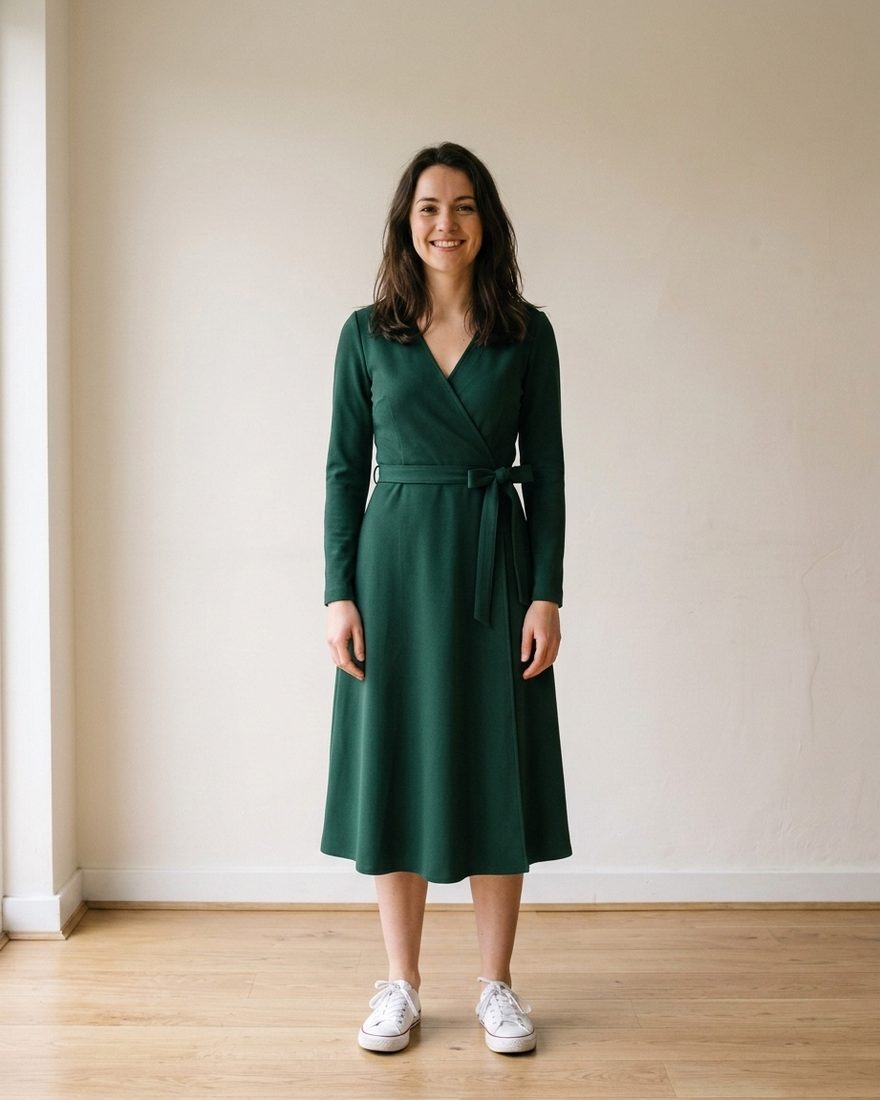
Choosing your photo
The single biggest lever on quality is the photo of you, not the app. For dresses specifically:
- Full length, head to feet. Half the point of a dress try-on is where the hem lands. A cropped photo cannot show you that.
- Fitted clothing in the source photo. Jeans and a plain t-shirt read cleanly. An oversized coat hides your actual shape and the result inherits the guess.
- Straight on, not angled. Three-quarter poses work, but front-on gives the model the most to work with.
- Even light. Window light or shade. Hard midday sun throws shadows that fight the rendered fabric.
- Plain background. Not required, but a busy background gives the model more chances to smear something.
Keep more than one. A full-body shot for dresses and coats, a closer crop for tops, maybe one in different lighting. Switching between them is the fastest way to improve a disappointing try-on.
What to judge, and what to ignore
Trust the image on:
- Hem length on your legs — the thing product photos most reliably mislead about, because the model is 178 cm.
- Neckline and shoulder line against your own frame.
- Colour against your skin and hair. A shade that sings on the model can go flat on you.
- Overall silhouette — whether an empire waist, a wrap or a straight column suits your proportions.
- Pattern scale. A large floral behaves very differently on different heights.
Don't trust it on:
- Size. It has no measurements of you. Size chart, always.
- Fabric weight and stretch. Drape is approximated well, but "does this jersey cling" is not something a still image settles.
- Fine hardware detail. Buttons, zips, small logos and delicate lace can drift from the original.
Fixing a result that looks wrong
In rough order of effectiveness:
- Change your source photo. Fixes most bad results outright, particularly if the first one was cropped, angled or dimly lit.
- Use a cleaner dress photo. A flat product shot or a shot on a model beats a crumpled item on a floor.
- Crop the garment photo tighter. If the product image contains three dresses, the model has to guess which one you meant.
- Just run it again. Generation is not deterministic; a second attempt on the same inputs often lands better.
Dress types worth checking first
- Maxi and midi. Hem position relative to your calf is the whole decision, and it is the thing you cannot infer from a product photo.
- Wrap and belted. Where the waist actually lands on you changes the garment completely.
- Bold prints. Scale is unpredictable across body sizes and heights.
- Occasion dresses. Bought once, worn once, expensive to return, and usually decided under time pressure.
- Second-hand listings. Vinted and charity finds are one-of-a-kind with no returns — the highest-stakes guess there is.
Questions people ask
Can AI really show me in a specific dress?
Yes — a specific dress, not a generic one. The model works from the actual product photo you gave it, so the colour, cut and pattern in the result are the ones you are about to buy.
Is it free?
Hoilo gives you a set of free try-ons before asking for a subscription — enough to check a dress or two without paying.
Do I need to make an account?
Not with Hoilo. Add one photo of yourself and start.
Will it tell me my size?
No, and be sceptical of anything that claims to from a single selfie. Try-on answers "does this suit me", size charts answer "will this fit me".
Where do my photos go?
With Hoilo, they stay in the app on your phone. The dress photo and your active photo are sent to the image model only to produce the try-on you asked for — see the privacy policy.
Try a dress on your own photo
Paste a link, share a screenshot, or snap it in the shop. Free try-ons to start, no account.
Get Hoilo for iPhoneiOS 16+ · Works with any shop